


Joyflix Plus
4.6287.00 Reviews
App Specs
- Version
- 1.0.7
- Updated On
- License
- Free
- Downloads
- 100,000+
- Developer
- Jayhawk Pipeline, L.L.C.
- Categories
- Entertainment
- Platform
- Android
Screenshots
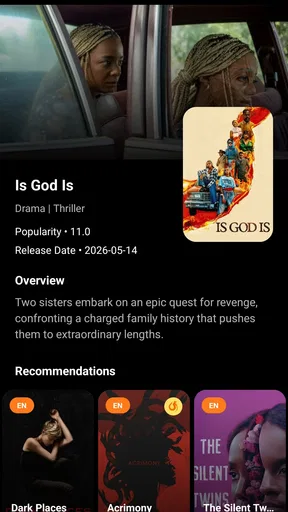
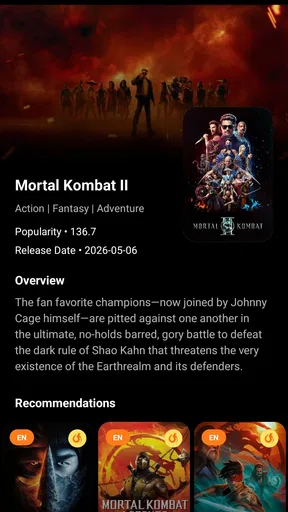
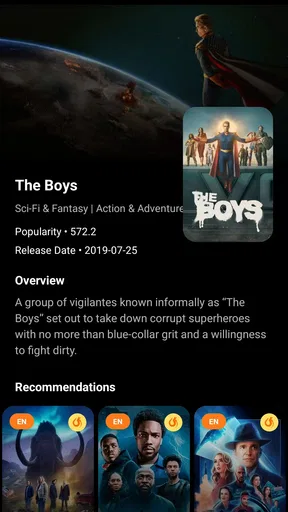
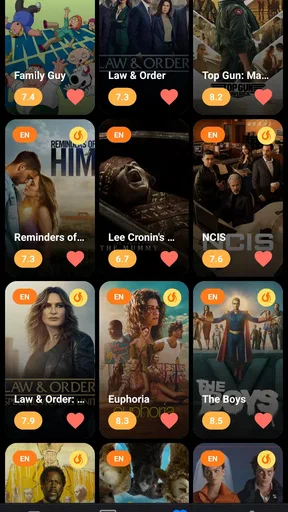
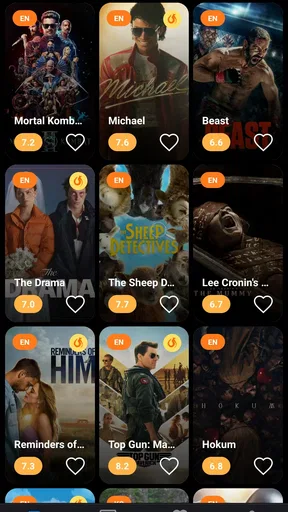
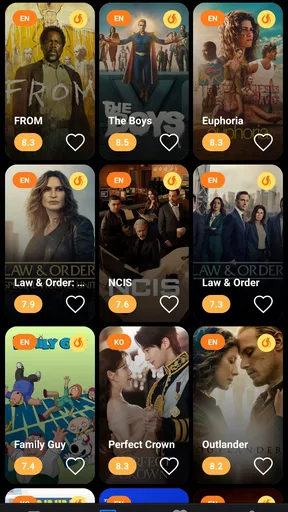
 Analysis by AppCompare
When I want a quick way to get basic information about a movie or TV show, I do not always need a full streaming service, a social network, or a complicated recommendation platform. That is the space where Joyflix Plus makes sense. It is a free entertainment app from Jayhawk Pipeline, L.L.C. focused on giving users a simple place to look up essential details about screen content.
My first impression was that this is best treated as a lightweight information companion rather than a replacement for a streaming subscription. It helps during those small decisions that happen every day: remembering what a film is about, checking whether a series sounds interesting, or gathering a few details before choosing something to watch. The app’s straightforward purpose is also its main appeal, although it means users expecting playback, deep personalization, or a large set of viewing tools may find the experience limited.
How Joyflix Plus fits into an everyday viewing routine
The most useful baseline workflow is uncomplicated. I open the app when I already have a movie or show in mind, browse the available information, and use what I find to decide whether it deserves more attention elsewhere. That makes it practical when friends are discussing a title, when I see a recommendation in a message, or when I am trying to choose something before starting a longer evening of streaming.
For example, imagine that I have a free half-hour before leaving home and someone mentions a series I have never watched. Instead of opening several services and searching through unrelated menus, I can use Joyflix Plus as an initial checkpoint. I look for the basic description, decide whether the premise fits my mood, and then move to the service that actually provides access if I want to watch it. This two-step habit keeps the decision separate from the viewing process.
That separation is important. Joyflix Plus is not presented as a complete entertainment ecosystem, so I would not install it expecting an all-in-one library, playback controls, downloads, or account-based viewing history. Its value comes from reducing the amount of effort needed to understand a title. In my experience, that is enough to make it useful on a phone, especially when I want information without committing to a subscription screen or opening a video platform first.
The app belongs to the entertainment category, but its role is closer to a compact reference tool than to a traditional streaming app. That distinction helps set the right expectations. If your normal routine is “search, read a little, then choose where to watch,” it can fit naturally. If your routine is “open one app and immediately start playing,” a streaming service remains the better option.
Joyflix Plus is free, which lowers the barrier to trying it for occasional searches. I also found that its simple purpose makes it easier to recommend to someone who does not want another complicated media dashboard. The trade-off is that a free information-focused app may not offer the depth, personalization, or integration found in larger entertainment platforms. I would judge it by how quickly it answers a basic question, not by whether it replaces every other tool in my media routine.
Worth Reading Before You Choose

EA SPORTS FC Mobile 26 Is a Bigger Football Game, but It Takes Time

Flipboard Shows What News Apps Must Do Beyond the Feed

Switching to Android Auto Means Rethinking Your Driving Routine

Google Calendar Makes a Crowded Week Easier to Manage

Ludo King Makes the Most of the Minutes Between Plans

Baby Panda World Brings Quick Play to Modern Phones, but Its Game Library Feels Busy
What I check before relying on it
Before using any entertainment information app regularly, I like to confirm whether it is suitable for the people who may use it. Joyflix Plus carries a Teen content rating, so I would not treat it as automatically appropriate for younger children. A parent choosing an app for a shared family device should still use personal judgment and supervise how it is used, particularly because movie and television subjects can vary widely.
Device compatibility is another practical consideration. The app requires Android 8.0 or later, so it should work on many reasonably current Android phones, but an older handset may not meet that requirement. I would check the operating system before troubleshooting installation. That small step prevents a common mistake: assuming a problem is caused by the app when the device simply falls below the minimum version.
The current release is version 1.0.7. I see that as a sign to keep expectations measured. The app may be perfectly usable for its central task, but I would not assume it has the maturity or breadth of a long-established media database. Newer software can improve quickly, yet it can also feel less polished around the edges. For casual use, that is not necessarily a problem; for someone building a detailed personal catalog, it matters more.
Its public reception is encouraging, with a 4.5 average from around a thousand ratings and more than a thousand written reviews. The app has also passed the hundred-thousand-install mark, suggesting that it has reached a meaningful audience without making popularity the only reason to try it. I take those figures as a useful signal, not as proof that every search or screen will suit every user.
Settings and habits worth checking first
My first recommendation is to spend a moment looking through the app’s available controls instead of assuming the default presentation is the only way to use it. With a focused information app, small interface choices can affect how quickly you scan titles. If there are display, navigation, or preference options available in your installation, I would check them early and keep only the ones that make searching more comfortable.
I also prefer using a consistent search habit. When I know the exact title, I enter the most distinctive part rather than typing a long sentence. When I only remember an actor, character, or rough premise, I treat Joyflix Plus as a starting point rather than expecting it to solve an uncertain memory instantly. This prevents frustration and makes the app’s basic-information role clearer.
A useful repeatable workflow is to separate discovery from verification. First, I use the app to understand what a title is about. Then I verify practical viewing details through the relevant streaming or rental service before making plans. This avoids a common disappointment: finding an interesting show in an information app and assuming that the same app will tell me where it is available or play it directly.
I would also avoid treating one short description as a complete review. Basic information can help me decide whether to investigate further, but it cannot replace trailers, critic opinions, episode details, or my own sense of whether the subject matter is suitable. Joyflix Plus works best as the first filter in a larger decision, not the final authority.
Faster patterns for regular users
Once I use the app repeatedly, I find that speed comes from having a purpose before opening it. If I am choosing a film for tonight, I ask one clear question: do I need a quick premise check, a title lookup, or a broader browsing session? Starting with that question keeps the app from becoming another place where I scroll without deciding.
For a group decision, I would use Joyflix Plus as a neutral first pass. Each person can suggest a title, and I can compare the basic information without immediately opening multiple streaming apps. The important advantage is not advanced recommendation technology; it is reducing the back-and-forth involved in remembering what each title is about. After that, the group can make a choice based on mood, availability, and time.
Another efficient pattern is to use it when a title appears outside your usual services. A poster, conversation, or social post may mention a movie that you do not recognize. Instead of dismissing it or spending several minutes searching manually, I can use the app to establish the basics. If the premise appeals to me, I continue with a more specialized source. If it does not, I move on quickly.
I would not keep Joyflix Plus open as a permanent replacement for a watchlist unless the version on my device clearly supports the organization tools I need. A simple information app can be excellent for immediate lookups but less convenient for long-term planning. My practical solution is to use it for research and keep final viewing choices in the streaming service or note-taking method I already trust.
There is also a useful distinction between “I want to know about this title” and “I want something to watch.” The first request fits the app directly. The second may require stronger discovery features, filters, recommendations, or availability information than a basic reference experience provides. Recognizing that difference is one of the easiest ways to avoid judging the app unfairly.
Where the simple approach reaches its limits
The main limitation is scope. Basic movie and television information is useful, but experienced viewers often want more: detailed cast and crew browsing, episode-by-episode organization, personalized suggestions, watch history, availability by service, parental controls, or direct playback. I would choose a specialized database for research-heavy questions and a streaming platform for watching. Joyflix Plus sits between those destinations and handles the first look.
That can create extra steps. I may find a title in the app, then switch to another service to check whether it is available, and perhaps open a third source for reviews or trailers. For a single casual lookup, this is reasonable. For someone who researches many titles every day, the repeated switching may become more noticeable than the convenience of the initial search.
Another limitation is that a compact interface can leave users wanting more context. A basic description may tell me the central idea, but it may not answer whether a series is finished, how long it is, or whether it matches a particular viewing preference. I would not blame the app for being focused, but I would factor that focus into my decision to keep it installed.
The Teen rating also makes it less suitable as an unsupervised discovery tool for children. A family looking for a carefully filtered kids’ catalog should choose an app designed around that purpose. Joyflix Plus may still be useful on a shared device when an adult is making the selection, but I would not present it as a child-first entertainment solution.
Android users with older phones should check compatibility before making it part of their routine. The minimum requirement of Android 8.0 is not unusually demanding, yet it can exclude devices that have been kept for many years. On a supported phone, the free price makes experimentation easy; on an unsupported phone, no amount of clearing storage or reinstalling will solve the underlying compatibility issue.
I would also keep the app’s relatively early version in mind. Version 1.0.7 can be entirely adequate for quick information, but users who expect a broad set of refined tools may prefer an established alternative. My advice is to install it for a specific need, test that need directly, and keep it only if it saves time compared with the apps already on your phone.
Who should use it and who should skip it
I recommend Joyflix Plus to casual movie and television viewers who want a free, low-commitment way to check basic title information. It is particularly suitable for people who often hear about unfamiliar shows, compare a few options before opening a streaming service, or want a simple reference point on Android. Its focused design is easier to understand than a platform overloaded with social feeds, subscriptions, and playback features.
I would also recommend it to users who value a repeatable research habit. Open the app, identify the title, read the essentials, and then decide whether another service deserves your time. That workflow is modest but practical, and it avoids confusing information gathering with entertainment playback.
I would skip it if your priority is watching content inside the same app. I would also look elsewhere if you need deep catalog research, robust personal organization, precise family filtering, or recommendations shaped around a detailed viewing history. In those cases, a streaming service, established movie database, or dedicated watchlist tool will probably provide a more complete experience.
My final view after using it as a reference companion
Joyflix Plus succeeds when I use it for what it is: a free entertainment app that helps me get basic information about movies and TV shows without turning a simple question into a large project. The developer, Jayhawk Pipeline, L.L.C., has kept the central idea easy to understand, and that clarity is more valuable than a long list of features I may never use.
Its strongest quality is convenience at the beginning of the viewing journey. It can help me decide whether a title deserves a closer look, support a quick group choice, and provide a first stop before I move to a service that handles playback or availability. The most important habit is to treat it as one stage in that process rather than expecting it to perform every stage.
My honest recommendation is therefore conditional but positive. Install it if you want a lightweight title-information tool and your Android device meets the requirement. Use it with a clear question, check its available preferences, and keep a separate service for watching and detailed planning. For quick decisions, its simplicity is an advantage; for complete entertainment management, that same simplicity becomes the boundary.
Pros
- Simple interface makes browsing movies and shows quick.
- Personalized recommendations help users discover new content.
- Supports multiple devices for flexible viewing at home or on the go.
- Regular content updates keep the catalog feeling fresh.
- Playback resumes easily
- making it convenient to continue watching later.
Cons
- Content availability may vary depending on your country or region.
- Some titles may require a separate premium subscription.
- Video quality can depend heavily on your internet connection.
- The app may use significant mobile data during high-quality streaming.
- Occasional bugs or loading delays can interrupt playback.
FAQs for Joyflix Plus
What is Joyflix Plus, and what kind of content does it offer?
Joyflix Plus is presented as an entertainment streaming application designed for watching video content on a mobile device. Depending on your location and the current version of the app, its catalog may include movies, series, short videos, or other on-demand programming. Before downloading, check the official store listing and in-app descriptions because available titles, languages, subtitles, and supported regions can change over time.
Is Joyflix Plus free to download and use?
The application may be free to download, but that does not necessarily mean every feature or video is available without restrictions. Some content can require registration, a subscription, advertising support, or an additional payment. I recommend reviewing the pricing information shown in the official app store and checking the terms inside the app before starting a trial, entering payment details, or subscribing to any recurring plan.
Is Joyflix Plus safe to install on Android or iPhone?
For the safest installation, download Joyflix Plus only through a legitimate Google Play Store or Apple App Store listing, if an official version is available in your country. Avoid modified APK files, unofficial download pages, and versions requesting unnecessary permissions. Before installing, review the developer name, privacy policy, recent user feedback, and requested access, since these details can help identify whether the application is trustworthy.
Does Joyflix Plus require an account or an internet connection?
Streaming applications commonly require an internet connection to load catalogs, play videos, synchronize preferences, and verify subscriptions. Joyflix Plus may also ask you to create an account or sign in before accessing certain features. A stable Wi-Fi or mobile-data connection is recommended for smoother playback. If offline downloads are offered, check whether they are limited to subscribers and whether downloaded videos expire.
What should I check before subscribing to Joyflix Plus?
Before subscribing, carefully review the available plans, billing frequency, renewal conditions, supported payment methods, and cancellation procedure. Confirm whether a free trial automatically converts into a paid subscription and whether prices vary by country or platform. It is also worth checking video quality, subtitle and audio options, device limits, simultaneous streams, advertisements, and the refund policy so the service matches your expectations.


